Maintenance Manager for Manufacturing Release Archive
Below is a list of archived enhancements and bug fixes deployed to Maintenance Manager for Manufacturing.
2026 Release Notes
 Release Notes 08.25.2026 - Version 26.02
Fixes & Improvements
In the current release of Maintenance Manager for Manufacturing, the following fixes and improvements have been implemented:
Full Work Order History in PM Activity Tab
-
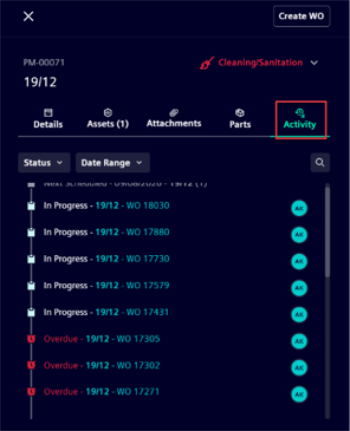
Every Preventive Maintenance record now has an Activity tab showing the complete timeline of Work Orders it has generated.
-
Browse Work Orders grouped by date, expand any date group to see individual records, and filter by status or date range — or search by keyword.
-
Click any Work Order to go directly to its details.
Complete Work Order History in Asset Activity Tab
-
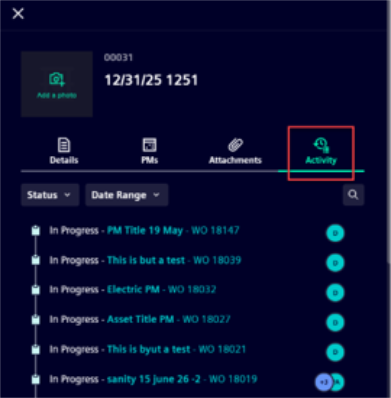
Assets now include an Activity tab that lists every Work Order ever raised against that asset.
-
Use Search, the Status filter, or the Date Range filter to narrow the list, then tap any Work Order to view its full details.
Add and Remove Assets from an Existing PM
-
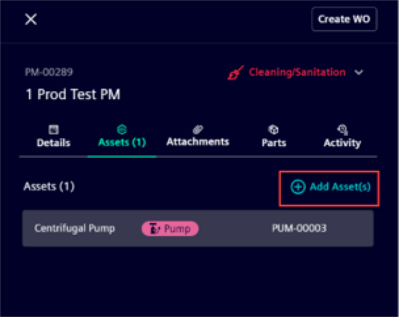
You can now modify the asset list on a PM after it has been created.
-
Open any PM, go to its asset list, and use Add Asset or the remove option to make changes.
PM Attachments Automatically Shared with Work Orders
-
Attachments added to a PM are now automatically copied to every Work Order the PM generates — both scheduled and reactive.
Refreshed Asset Tabs Layout
-
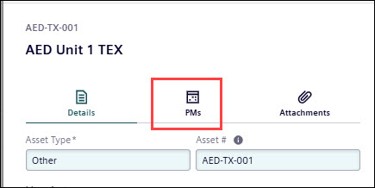
The Details, PMs, and Attachments tabs on Asset records have been updated to match the latest design standards.
Bug Fixes
-
My Workspace date sections — The Trips to Approve and Next Seven Days sections now display the correct dates.
-
PM name overflow on mobile — Long PM names no longer overflow their container in the View PM panel on mobile devices.
-
Blank Select Parts screen — The Select Parts screen in the Work Order side pane no longer shows a blank page when no inventory items are available.
-
Asset selection lost on scroll — Selecting 100 assets and then scrolling in the PM asset picker no longer clears the selection.
Release Notes 07.30.2026 - Version 26.01
Fixes & Improvements
In the current release of Maintenance Manager for Manufacturing, the following fixes and improvements have been implemented:
Work order priority levels
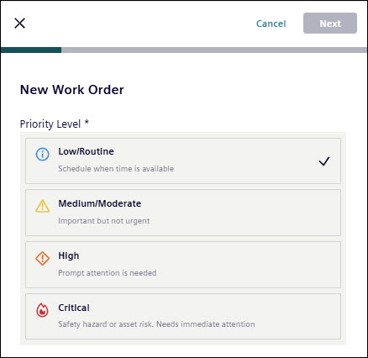
The previous emergency toggle has been replaced with a more flexible priority model for work orders. Teams can now assign one of four priority levels: Critical, High, Medium, or Low.
-
Priority is visible across key work order views, including list, Kanban, and calendar views.
-
Visual indicators make it easier to identify urgent work at a glance.
-
Email notifications now reflect the selected work order priority.
Preventive Maintenance from Asset Details
Users can now create and manage preventive maintenance schedules directly from asset details. This makes it easier to stay in context while planning recurring work for a specific asset.
-
A dedicated PMs tab has been added alongside the Details and Attachments tabs.
-
New PM schedules can be created with the asset already linked.
-
Users can move more easily between asset and PM views.
-
PM category information is displayed more clearly for faster identification.
PM Attachments and Work Order File Propagation
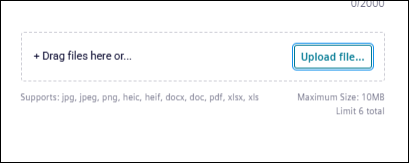
Users can upload attachments while creating a preventive maintenance schedule.
-
Attachments added to a PM schedule automatically carry forward to work orders generated from that PM.
-
This helps ensure technicians have access to documents, images, and supporting files when work is performed.
Supported file types include image, document, spreadsheet, and PDF formats commonly used in maintenance workflows.
Performance and Reliability Improvements
This release also includes platform improvements that support a smoother experience.
-
Preventive maintenance search performance has been improved for faster results.
-
Service updates increase overall reliability and support more consistent application behavior.
-
Resolved an issue where the focus indicator was not visible on the Refresh, Maximize, and Filter buttons during keyboard navigation in Chrome and Firefox. Tooltips now appear correctly on keyboard focus across all browsers.
-
Resolved an issue where a screen reader did not announce the upload failure message when a file upload failed.
-
Resolved an issue where a screen reader announced the Filter button, filter list items, and the Minimize button with incorrect labels.
-
Resolved an issue where keyboard and screen reader users could not activate the Download and Delete attachment buttons, which were also announced twice during tab navigation.
Release Notes 07.15.2026
Rebranding to Siemens Software
Brightly is now Siemens. Same world-class software, new look and feel.
Maintenance Managerfor Manufacturing has been rebranded to align with Siemens.
This update introduces Siemens branding across the application, replacing previous Brightly Software branding within customer-facing screens and supporting documentation.
The support email displayed in help documentation reflects the new Siemens address for the Support Team.
As part of this transition, support contact information has also been updated, and help documentation now reflects the Siemens Support Team email address.
This rebranding does not affect product functionality and is intended to provide a consistent experience across the Siemens Maintenance Manager for Maufacturing software offerings.
